Optional Synchronization Rule Parameters

Recently I needed to extend a simple outbound sync rule (FIM 2010 R1) to provision a business email address to an HR system.  In the target HR system, multiple contact records can be recorded for a user, and under normal conditions a “business” contact was to be set with the exchange email address from AD.  However, in a test environment where “new starter” emails are to be sent from the HR system I didn’t want to use “real” email addresses but a test mailbox instead.

I figured I simply needed a means of overriding an EAF in a sync rule with a constant email address – purely to support my testing needs.  Under normal circumstances there should be no override, so I figured I could use a workflow parameter and only set a value in the test scenario.  The override idea seemed to work well – I could have identical sync policy in each of my DEV/TEST/PROD environments, but this way I could support this testing requirement without having to actually change the sync rule itself.  Test emails were indeed sent to the test mailbox as required.

I set up my EAF in my sync rule like this (CS and MV prefixes for explanatory purposes only):

CS.email = IIF(Eq(Trim($EmailOverride),""),MV.email,$EmailOverride)

It seemed like a perfectly reasonable thing to expect to work – I assumed that if I simply didn’t supply any parameter value when I added the sync rule to the target user object, that the above logic would result in Eq(Trim($EmailOverride) returning a TRUE value.  I was wrong …

I only noticed there was a problem when I removed the override value and noticed that the pending exports subsequently produced had no email address value at all!  This broke my HR exports and indicated that I had a lingering problem with the above EAF.  This was confirmed when I compared the corresponding ERE for two different users – one created when the constant email value was present (which worked), and one when the value was removed (which failed).  What I noticed was that there was only an XML value in the Synchronization Parameter binding on the ERE when there was a value specified on the workflow which attached my sync rule.  When I specified an override email I ended up with this in the SR parameter :

<sync-parameter><name>EmailOverride</name><value>dummy.mailbox@mydomain.com</value></sync-parameter>

… but when there was no value specified, rather than getting this:

<sync-parameter><name>EmailOverride</name><value></value></sync-parameter>

… I actually got no SR parameter at all (i.e. no XML whatsoever).  This was not what I expected, and explained why my EAF wasn’t working.

I then tried each of the following without success:

  • Eq($EmailOverride,Null())
  • IsPresent($EmailOverride)

I finally had to settle for this:

CS.email = IIF(Eq(Trim($EmailOverride),”NONE”),MV.email,$EmailOverride)

and resort to having to specify “NONE” as my default workflow parameter rather than an empty string.

So the upshot of this post is to make the point that (for FIM2010 R1 at least) there is effectively no such concept as an “optional sync rule parameter”.  Why?  Because there doesn’t appear to be a way to successfully test for the (lack of) presence of a value in a parameter.

I would be interested to find out if anyone has observed this same behaviour for R2?

Posted in FIM (ForeFront Identity Manager) 2010 | Tagged , | Leave a comment

MS TechEd 2013

Finally on my way this morning to join friends and colleagues on the annual pilgrimage to the Microsoft tech-fest on Australia’s premier convention location, the sunny Gold Coast. My colleague Carol will be presenting both of the sessions listed against the Forefront Identity Manager technology stream, with her “Identity Jigsaw Puzzle” topic proving the most popular so get in early for that one. It’s not hard to understand why …

Don’t be fooled by the latest biometrics hype – there’s definitely nothing sexy about Identity Management – at least in my experience. This is always reinforced at events like this, where the focus is always on the latest glittering release of Windows Server or Azure technology. Yet when the buzz has died down and you’re faced with pulling it all together, you find you’re faced with the same old challenges we always have – they’ve just morphed into a few new forms.

Get along to Carol’s session to make your own connections between the pieces in your own puzzle, and come and have a chat to either of us. You will find me at our joint OptimalIdM/UNIFY booth this year, so come and introduce yourself and we will no doubt find some common ground on what is often a complex and challenging topic. See how the “Microsoft Stack” has extended well beyond the shrink-wrapped FIM 2010 R2 software.

See you there!

Posted in FIM (ForeFront Identity Manager) 2010 | Tagged | Leave a comment

Error saving the FIM Sync key set

Ran into something unusual just now with the FIM R2 Sync install – at the end of the install after having selected a folder to save the *.bin file to, there was a delay of about 30 seconds before I got the following error dialog:

“The Forefront Identity Manager Synchronization Service setup wizard was unable to back up the key set. <hr=0x80131904> … try again?”

I figured there was a permissions problem with the target folder location, so I tried several times, including creating c:\temp, giving full access permissions to everyone, and saving it there – but it didn’t matter how many times I tried I got the same error.  Eventually I selected “no” and the installer completed with a success status (nothing in the error log or any warning that the key was yet to be saved).

At this point I simply ran the Synchronization Service Key Management program and successfully saved my miiskeys-1.bin file without a problem.

So I still have no idea what the error actually was, but if anyone does have the same experience, rest assured that you can still happily skip this bit so long as you remember to do it straight afterwards using the utility.

Posted in FIM (ForeFront Identity Manager) 2010 | Tagged , | 4 Comments

What is Identity Broker?

To paraphrase an earlier post, FIM Sync would be easy if every system or application was as straight-forward to provision and sync with as the AD or ADLDS connector. It struck me sitting in Chris Cox’s FIM 2010 RC0 training back in January 2009 that with all the attention now on FIM policy and workflow, and all things to PowerShell, it was almost as though there was a blind assumption that this was actually the case. This also seemed to be the assumption during an Omada 6.1 training course in June 2008. The fact that systems such as HR, telephony, ERP and bespoke applications we all need to leverage as sources of truth for identity are anything but that simple was seemingly trivialised. Now we have ECMA2 and it’s even easier than before, right? Well think again. Think about any instance of the AD connector and what FIM Sync features we take for granted here:

  • LDAP API
  • Delta imports
  • Multi-value attributes
  • Multiple object classes
  • Bi-directional attribute flows
  • Change events

Now think about connecting to just about any commercial HR system – e.g. in Australia we have chris21, Aurion HR, SAP, Talent2, Empower HR, Peoplesoft HR … the list goes on. Some of them have APIs and some don’t, but apart from that can you imagine how you would go about building a custom connector to any of these with one or two let alone ALL of the above features? Add to that the fact that most of the data you need to present in a consolidated Person object is invariably stored in at least half a dozen separate but related data stores, and you quickly find you’re compromising performance and usability in order to bring all this information together. After a short while you pretty much find yourself trying to sync apples with oranges … This is why UNIFY’s Identity Broker 4.0 connector platform is a game changer. You could think of it as an proxy LDAP API for application XYZ. Any application or service where there is an Identity Broker Connector for Application XYZ will provide ALL of the above features and some (such as derived attributes and transformations in the connector layer). Now you can sync apples with apples 🙂 … and scale to the millions of apples for good measure. This is not so much a plug for some fantastic technology, but an attempt to dispel some of the confusion and misinformation I’m hearing from people in the market about what Identity Broker is about – not to be confused with FIM Event Broker which by the way leverages any such connector to deliver real time sync too. So today any FIM 2010 training course which continues to sets the same expectation it seemed to in 2009 sits comfortably with me, knowing that this can now be the case. We should all rejoice that more people can take a dip in the FIM pool for themselves (i.e. more CAL sales!) without running into the brick walls of the past. There – I got that off my chest!

Posted in Event Broker for FIM 2010, FIM (ForeFront Identity Manager) 2010, ILM (Identity Lifecycle Manager) 2007 | Tagged , , , | Leave a comment

Server email notifications

Sometimes it pays to take the line that “surely this must be possible already” – especially when it comes to Windows Server components that have evolved with each version of the operating system – in my case today with the humble Windows Event Log and Task Scheduler.

Problem

Automatically applied patches had triggered a FIM server reboot during the small hours of Wednesday last week, but the event had gone unnoticed … until questions were asked about user accounts that weren’t being provisioned.  On investigation I found that a dreaded “stopped-server” error had occurred shortly after the reboot for one of the run profile operations, and since this had occurred during what I had defined as a “re-baseline” process, it had halted all subsequent run profiles from being executed.  On re-mediating the problem, I figured something must be able to be done to automatically notify an admin of these types of events in the future.

The Solution

There were 3 parts to my solution, all of which were ridiculously easy to implement:

Custom event log view

From the Windows Event Viewer console, I clicked on Custom Views with the right mouse button and selected Create Custom View … and defined a filter by specifying the FIMSynchronizationService as the event source and the status as either ERROR or CRITICAL – then saved it with the name “FIM Synchronisation Errors”.

Image

Attach a task to the log view

Again, from the Windows Event Viewer console, I clicked on my new custom view with the right mouse button and selected Attach a Task To this Log …
Attach a task to an event log
Create a basic task

The name of the task was the name of my custom view, which made sense to me, and I entered a sensible description and clicked Next>:
Custom Event Filter

Nothing to do here, so I clicked Next> again:
Action

I selected “Send an e-mail” and clicked Next>:
Send an email

This was where I actually had to start to think … and where I realised the email text was going to be rather limited, but would suit my purposes.  There may well be ways to do token substitutions here, but I didn’t need to worry here so I didn’t.  Note that you will need to specify a suitable SMTP server name on your network (I just grabbed the one from my FIM Resource Management Server config).  I would also recommend specifying a distribution list as the target email address here rather than individual email addresses – makes for better manageability moving forward (no less than a FIM-managed d-list of course!).

I then clicked Next>:
Summary

Importantly, I selected the “Open the Properties dialog for this task when I click Finish” checkbox before clicking Finish:
Task Detail General

I changed the task to “Run whether user is logged on or not” but left my own identity as the context for now – in a Production environment this should be a service account (or maybe even a managed service account were this idea to be supported).

I clicked on the Settings tab:
Task Settings

… and turned on the “Run task as soon as possible …” checkbox.  I also reduced the default run time limit from 3 days to 2 hours!  I then clicked OK.

That was it – now all I had to do was test it, and suffice to say it worked first time (I just had to go hunting in my junk mail folder to find it!).

Create a basic email task on system start

This was an absolute doddle!  From the Windows Task Scheduler I selected “Create Task…”, entered a name “FIM Synchronisation Server Restarted” and suitable description, then clicked Next>:
Task Trigger

I selected “When the computer starts” and clicked Next> … you don’t need to see the rest, and this worked first time too.

So … sometimes you don’t need the proverbial “sledge hammer to crack a walnut” … often it just takes a bit of hunting around to see what you get “out of the box” on the latest Windows Server platform.

Posted in FIM (ForeFront Identity Manager) 2010 | Tagged , | 5 Comments

Managed Service Accounts

A friend posted a link to the latest edition of a document entitled Best Practices for Securing Active Directory from Microsoft IT. Nice document – full of useful tips on the subject. One thing that I noticed was missing, however, was any reference to feature introduced with Windows 2008 R2 and Windows 7 known as the Managed Service Account.

Maybe you have who heard heard of the concept, or maybe like many you haven’t, but let me explain the “problem space” first …

As an Identity Management consultant on the Microsoft platform I’ve found securing service accounts problematic from the start. Here are a couple of anecdotes which may be familiar.

  1. A customer lodges a support call for an ILM 2007 (Windows Server 2003 platform) solution where an Active Directory Application Mode (ADAM) management agent run profiles has been failing for some time. Investigation finds that while there is a standard in place that all service accounts are assigned a strong password but had the “account never expires” checkbox set, the password for the ADAM service identity is “incorrectly” allowed to expire. Remediation would no doubt be to reset the password and this time set it never to expire.
  2. A customer maintains a file of all the passwords for the dozen or so service accounts that were created to run a moderately complex FIM solution. While the password strength is strong, the security of these accounts is potentially compromised both by the need to store these passwords somewhere to allow the FIM solution to be supported.
  3. A FIM customer is required to observe a policy whereby service account passwords are never divulged to a non-system administrator within the company. This causes no end of problem when the FIM consultant is attempting to troubleshoot/test/deploy components of the FIM solution when the sys admin is not available.

If any of the above are issues for you too, as I suspect they will be, then this feature becomes a must have. In a nutshell, this is a facility whereby service accounts are created in AD in a way such that when they are assigned to a service the password is never entered.

Sound too good to be true?

Well yes and no … no because you can set up Exchange and ADLDS this way now and it works. Yes because at the time of writing (June 2011) neither SQL 2008 nor Windows Task Scheduler supported the idea. However, going by this blog post it appears that SQL 2012 finally does! 🙂

How can that possibly work? Well I’ll let you read the posts linked above to find out. There’s not much to it, and it will be well worth the effort. I have yet to try this myself, but in addition to the plethora of service accounts in any FIM deployment, I can’t see why all of the FIM 2010 connector windows identities shouldn’t be able to work this way too. If anyone has an opportunity to try this out before I do, please let me know by posting back here. If it turns out not to be supported, then I’ll be sure to make this a FIM feature request on Connect!

Why don’t you try this for yourself?

Posted in Active Directory, FIM (ForeFront Identity Manager) 2010, ILM (Identity Lifecycle Manager) 2007 | Tagged , | 6 Comments

ECMA2 Update

The FIM Product group has has released a new version of ECMA2, one new Connector and an update to two Connectors to Connect for pre-release evaluation. Read Peter Geelen’s review here.

Peter Geelen's avatarIdentity Underground

Source: https://connect.microsoft.com/site433/Downloads/DownloadDetails.aspx?DownloadID=48615

The FIM Product group has has released a new version of ECMA2, one new Connector and an update to two Connectors to Connect for pre-release evaluation.

A new release of the Sync Engine is available on Connect and it has ECMA 2.2 in it. These are the new features:

–        An ECMA2 Connector can be initiated and can run outside the sync engine. It is now possible to do a test driven implementation where you create all unit tests for your Connector in Visual Studio and test your Connector without even having a Sync Engine. You can also debug the Connector without having a Sync Engine present.

–        A new capabilities page and calling the capabilities later in the flow. It is now possible to ask the user for information and connect to the target directory and use that information for the Connector’s capabilities.

–        Added support for…

View original post 198 more words

Posted in FIM (ForeFront Identity Manager) 2010 | Tagged | Leave a comment

What to do if your FIM user RCDC breaks

A colleague ran into a problem yesterday which I had seen before, and before he rolled back and started from scratch I showed him this blog post by Thomas, which explained exactly what happened to me, and what I needed to do to correct it.

Unfortunately the SQL procedure ‘[debug].[ReplaceObjectIdentifier]’ Thomas refers to is still only available via a PSS call and not something I am comfortable to publish here.  Thankfully for my colleague we didn’t have to go through the process again, and I had written up a step-by-step instruction on how to apply the script last time which he could follow.  Here is that process in case anyone else falls down this rabbit hole …

The assumption here is that the 2 BROKEN RCDCs are Configuration for User Creation and Configuration for User Editing respectively.

TARGET ENVIRONMENT

  1. Open SQL Enterprise Manager for the target environment’s SQL FIMService database (in my case it was my client’s UAT Environment), and install the stored procedure [debug].[ReplaceObjectIdentifier]. (just open a new query window, select the FIMService database, and hit the EXECUTE button, i.e. )
  2. Backup the FIMService SQL Database for the target environment’s SQL server instance (we might as well back up the database with our new stored procedure!)
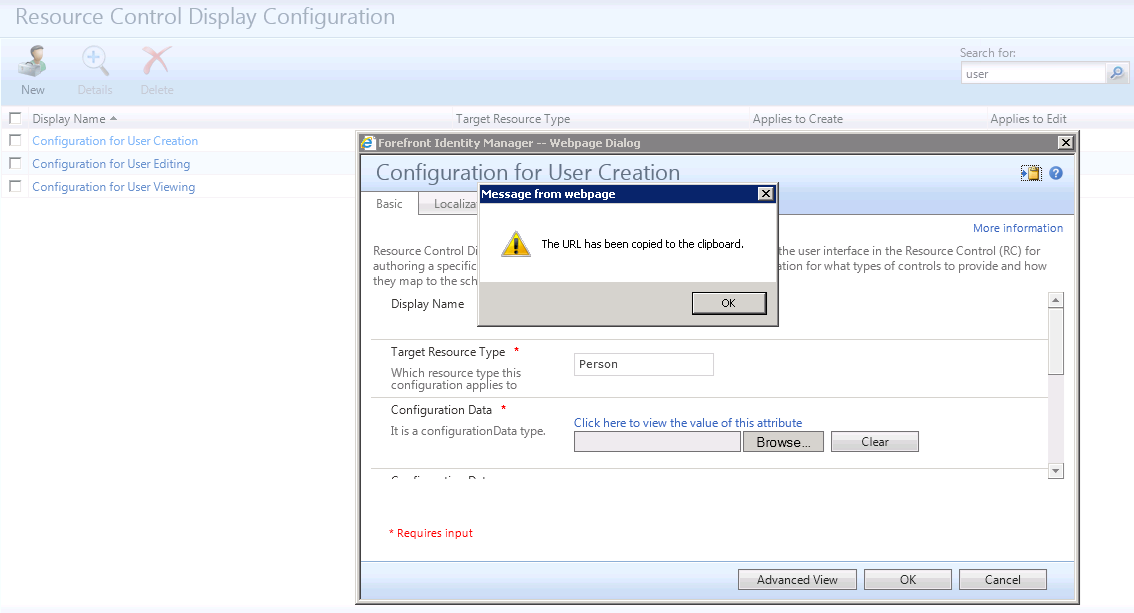
  3. Navigate to the Resource Control Display Configuration page, and search for USER (3 RCDC objects should be returned ONLY)
  4. Click on the Configuration for User Creation object to display the details dialog, then click on the  icon in the top right corner (to the left of the ? icon) to retrieve the corresponding TARGET GUID for CREATE USER:

    Create User RCDC

    Getting the guid from the URL

  5. Paste the contents of the clipboard into NOTEPAD to see something like the following:
    http://myfimserver/identitymanagement/aspx/customized/EditCustomizedObject.aspx?id=xxxxxxxx-xxxx-xxxx-xxxx-xxxxxxxxxxxx&type=ObjectVisualizationConfiguration&display=Configuration%20for%20User%20Creation&_p=1
  6. Extract the GUID from the above (i.e. xxxxxxxx-xxxx-xxxx-xxxx-xxxxxxxxxxxx) and save this as the FIRST parameter to the stored procedure call we’re going to make to fix our the Configuration for User Creation object.
  7. Click OK then Cancel to close the RCDC details dialog.
  8. Click on the Configuration for User Editing object to display the details dialog, then click on the  icon in the top right corner (to the left of the ? icon) to retrieve the corresponding TARGET GUID for EDIT USER.
  9. Paste the contents of the clipboard into NOTEPAD to see something like the following:
    http://myfimserver/identitymanagement/aspx/customized/EditCustomizedObject.aspx?id=yyyyyyyy-yyyy-yyyy-yyyy-yyyyyyyyyyyy&type=ObjectVisualizationConfiguration&display=Configuration%20for%20User%20Editing&_p=1
  10. Extract the GUID from the above (i.e. yyyyyyyy-yyyy-yyyy-yyyy-yyyyyyyyyyyy) and save this as the FIRST parameter to the stored procedure call we’re going to make to fix our the Configuration for User Editing object.
  11. Click OK then Cancel to close the RCDC details dialog.

 SOURCE ENFVIRONMENT

  • Repeat steps 3-11 above, but this time on the SOURCE FIM System (in my case this was my client’s DEVELOPMENT environment, which contained the original OOTB FIM guids).  This will give you the 2 guids you need from your WORKING environment to replace the ones in your target environment.  Save them both … the working ones for CREATE and EDIT will always be the same from one FIM site to the next, namely 03707f4c-45a2-4906-b24a-0254fae4f and cc802776-9127-400d-aee2-1b43d538d01e respectively.  Make sure you check these for yourself to confirm you’re using the correct source environment.

TARGET ENFVIRONMENT

  1. Back on the SQL server for your target (broken) environment, open a new query window in SQL Enterprise Manager and construct the following 2 calls to the newly installed SQL stored procedure:

— Configuration for User Creation

exec [debug].[ReplaceObjectIdentifier] ‘xxxxxxxx-xxxx-xxxx-xxxx-xxxxxxxxxxxx’, ‘03707f4c-45a2-4906-b24a-0254fae4fc09’

— Configuration for User Editing

exec [debug].[ReplaceObjectIdentifier] ‘yyyyyyyy-yyyy-yyyy-yyyy-yyyyyyyyyyyy’, ‘cc802776-9127-400d-aee2-1b43d538d01e’

  1. Hit the EXECUTE button, i.e. ExecuteSP) to correct the guids for your 2 broken RCDCs.
  2. On the FIM Portal Server, perform an IISRESET, and check that your Configuration for User Creation and Configuration for User Editing RCDC objects are functional once more.
Posted in FIM (ForeFront Identity Manager) 2010 | Tagged , | 7 Comments

Microsoft FIM Synchronization sheds some skin

It’s been 2 very busy months for me since I last posted, but before I get to the topic above, I want to mark the passing of 2012 and what it meant for me personally.

  • Travel – thanks to Carol’s encouragement, and Gil’s willingness to take on board a new speaker, I got to present 2 FIM topics at TEC in both San Diego and Barcelona. I will never forget the experience, and hope very much to do a lot more of this, although sadly it can no longer be TEC as we know it :(;
  • MVP – the year I was recognised by the Microsoft community of my peers for my FIM contributions, which I intend to continue making in 2013;
  • UNIFY – the year my company launched the FIMTeam site to draw attention to our investment in and commitment to this platform, mixing local with overseas talent to launching our brand on the global stage through a variety of media, including co-sponsorship of the TEC event in Europe with Dell and Microsoft;
  • Networking – through all of the above, together with this blog, the FIM Forum, and associated social media such as #FIM2010 on Twitter, I continue to meet interesting, inspiring and dedicated people eager to build a global community of professionals specializing in the Microsoft Identity and Access Management platform. A highlight was travelling to the other side of the globe with my wife and getting to know one of these people and his family in person for a weekend as their guest – priceless!

With such a hectic but resoundingly satisfying 2012, the last 2 months were supposed to be all about taking time out and being with friends and family. I have to thank my family and friends for their patience with me during this time, however, because time spent on the river 2 hours from my home (the new banner is an evening panorama taken just a week or so ago now) was interspersed with work phone-calls and Telstra 4G network facilitated live meetings at 3:30 am in the morning from the deck of a houseboat. The work stuff was what can be expected when you engage in FIM project work in the education sector, when the culmination of over a year’s work and planning happens to invariably coincide with the weeks of school holidays just prior to the start of the school year. The live meeting in the small hours, however, was something that some might have argued I should have given my apologies … but I knew it was about a topic that was of enormous interest to me, which brings me to the title of this post.

This Technet article was posted shortly afterwards, and at the time I must say that there was more than a touch of trepidation among some of us on that call. Everyone seemed to have a heightened sense of ownership of this topic, since most of us have been brought up on ILM2007 and MIIS2003 before it, and every single list item was about a feature of what we know now as the FIM Sync Engine.

For me personally, I have always found the beauty of this part of FIM is its stability and consistency over the best part of a decade. While there have been more than just a few moments of frustration and anxiety brought about by its quirkiness, complexity and through-put limitations, in many ways it has become like a familiar companion. When I find a good thing I tend to stick with it – be it a reliable car, a favourite bottle of red wine, an old woolen jumper, or even a mundane coffee cup. This trait of mine tends to annoy some in my family who would prefer I moved on … and in a funny kind of way I look at this 10 year old identity sync technology in a similar light.

When this kind of thing happens with me, I tend to overlook the negatives that others are quick to point out, and let myself dwell on the positives which are generally behaviours that I can rely on. In the case of this tool, it is for very good reason that I feel this way, due in no small part to the many, many hours I’ve invested in learning its nuances inside out. I don’t like surprises when it comes to those nervous moments (usually when everyone else is asleep) when you have to finally release 1000s of pending exports to Active Directory, which you know if it goes awry will light up the client’s call centre like a Christmas tree in the morning with angry users who can no longer log into the network. A former colleague of mine had the simple mantra “know your products”, and I’ve possibly adopted his mantra like an obsession when it comes to this animal. So when I hear that changes are afoot like these, my response naturally is that someone might be about to pull the proverbial rug out from under me.

On skimming through the list of items marked for depreciation, I have to say I was more than a little chuffed to see the “attribute precedence” entry, after having cursed the idea of “equal precedence” on more than one occasion. When it comes to FIM Best Prectice, near the top of my list I tend to have the steadfast refusal to implement this feature, and I have to admit to feeling satisfaction in seeing this vindicated. This goes for the “do not recall attributes” item as well – I always felt this was a horrible idea, and am very glad to see this going. I see the deprecation of things like these 2 items as being a good thing for everyone – but unfortunately for some this will raise a level of angst when the feature has been implemented as a cornerstone of someone’s FIM sync design. Hopefully, however, there won’t be too much resistence to either of these features being read their last rites.

There are other items in this list which I look at as simply “FIM growing up” (or shedding its skin as I have been thinking of it) … like where withdrawal of support for a legacy technology such as Exchange 5.5 is like releasing the handbrake on your car and letting it perform the way it was intended. As much as I am a lover of things familiar, I am also accused of being a hoarder … clinging onto that hard-to-let-go something that was once indispensable but is now just taking up space for fear you just may need it one more time. Remember that a deprecated feature doesn’t mean you can’t run the earlier version which once supported it … but on the flip side, there are certain things that we really must incent our clients to “get with the times” if we are to build them a solution that will provide them with a solid baseline for the future.

That of course leaves me with the couple of items which I really didn’t want to lose:

  1. Combined run profiles – it has always been the “delta import + delta sync” run profile that I hold dear, since this allows me to avoid continually re-syncing 1000s of disconnectors every time I process an incoming change. This has always been highly desirable for systems like Active Directory, where your AD MA will often only ever be responsible for managing just a subset of objects in the connector space. I have often found myself projecting dis-connectors onto the Metaverse as “dummy” object classes to avoid the ongoing sync overhead of processing them each delta sync cycle. My first thought was that this approach was suddenly going to be the only option if this is to be a deprecated feature, However the footnote here leads me to think that I am not alone in having to handle this scenario, and that if it finally is depreciated then we’ll have a better answer as to how to handle the scenarios for which we once used to use this feature.
  2. Transaction Properties – both myself and my colleagues @ UNIFY have always used these extensively with rules extensions under a number of entirely legitimate scenarios, such as detecting a variation between a CS object and an MV object that affects more than one inbound attribute flow (IAF), and ensuring that your code always works the same regardless of which order the IAFs happen to occur. Again, I expect that this feature won’t be deprecated without there being a new, better means of accommodating these scenarios.

Despite the moments of fear and trepidation, I thoroughly welcome the publication of this article as a sign that FIM is finally starting to “grow up” … an observation that is reinforced by word from the Microsoft product group that FIM scalability is an incredibly high priority, and that this means we should expect to see steps made to finally allow the distribution of sync processing over multiple sync services, which presently remains an uncomfortable inhibitor of the current architecture.

Posted in FIM (ForeFront Identity Manager) 2010, ILM (Identity Lifecycle Manager) 2007 | Tagged | 4 Comments

‘Failed to connect to the specified database’ error after sync server import

If you have a look at this thread, and others like it, you will see that one of the recommended fixes is to restart the server. It always seems such a cop-out type of fix to do this – sort of a last resort when nothing else works. However it was the only thing that worked and now I will do this as one of the first things to try when I next run into it.

The reason for this post is two-fold … as a reminder that this can come up to bite you when you least expect it, and to identify potentially a new source of the problem – sync server migration.

I was migrating a sync server config, using the server import method from DEV to UAT, and using the trick of hitting cancel whenever I was prompted for connection details. This way you get a second prompt asking if you want to reuse the existing details, which I almost always do (apart from the initial deployment). This I did, and after migrating some associated FIM Server config, I then kicked off a full re-baseline of the FIM sync service (FI/FS on each MA starting with the FIM MA), checking that the FIM MA FI/FS was working OK. I woke to find all the FI/FSs had worked fine, but the FIM MA export run profile was repeatedly restarting the FIM MA export after hitting the default 5000 error limit.

At first I couldn’t understand why the FIM MA import had worked but not the export … and then I recalled an explanation from Andreas (MS FIM product group) that sometimes the FIM MA bypasses the FIM Service endpoint and talks straight to the database. I figured this must have been one of these scenarios (I’m still on FIM R1 for this site). I then spotted something unexpected – although I had hit cancel instead of re-entering connection details for the FIM MA, the URL was now showing http://localhost:5725/ … which was the DEV configuration but not the UAT configuration (separate server for the FIM service and portal). I would have thought that this constitutes part of the connection details, but in this case it appears to be an exception – note to self to always check this again next time!

I then tried to update this to the correct URL and BANG – I started getting the dreaded exception in the thread title. I tried a few things and nothing worked, so as a last resort I restarted the FIM sync/sql server and voila – magic did happen, and export started working again. I would love to know why this is the case, but I’ll leave that for the FIM PG to work out. I’ll raise this with them soon but in the meantime always check this when you’re applying this approach to your sync server deployment.

Posted in FIM (ForeFront Identity Manager) 2010 | Tagged , , | Leave a comment